
How scoring works
Four tokens sit near you in a field, and the macro walks to one of them. Until you know how it scored them, that choice looks like a coin flip. It isn’t. You don’t need this page to gather with the defaults, but you’ll need it the first time you want to change one pick. It follows four real tokens through their scores in the Simulator, then has you change one number and predict the winner.
Load Dense cluster and look
Section titled “Load Dense cluster and look”Open Tools → Simulator and pick Dense cluster from Scenario preset. It’s a pretend field with six tokens bunched around you, Melody at 25%, Focus at 3 stacks, and Boost at 40%. On the right, the Simulator lists every token the macro could walk to, highest score on top. Each row has a Trace button. Trace opens that token’s score breakdown: every number that went into its score, in the order the macro applied them.
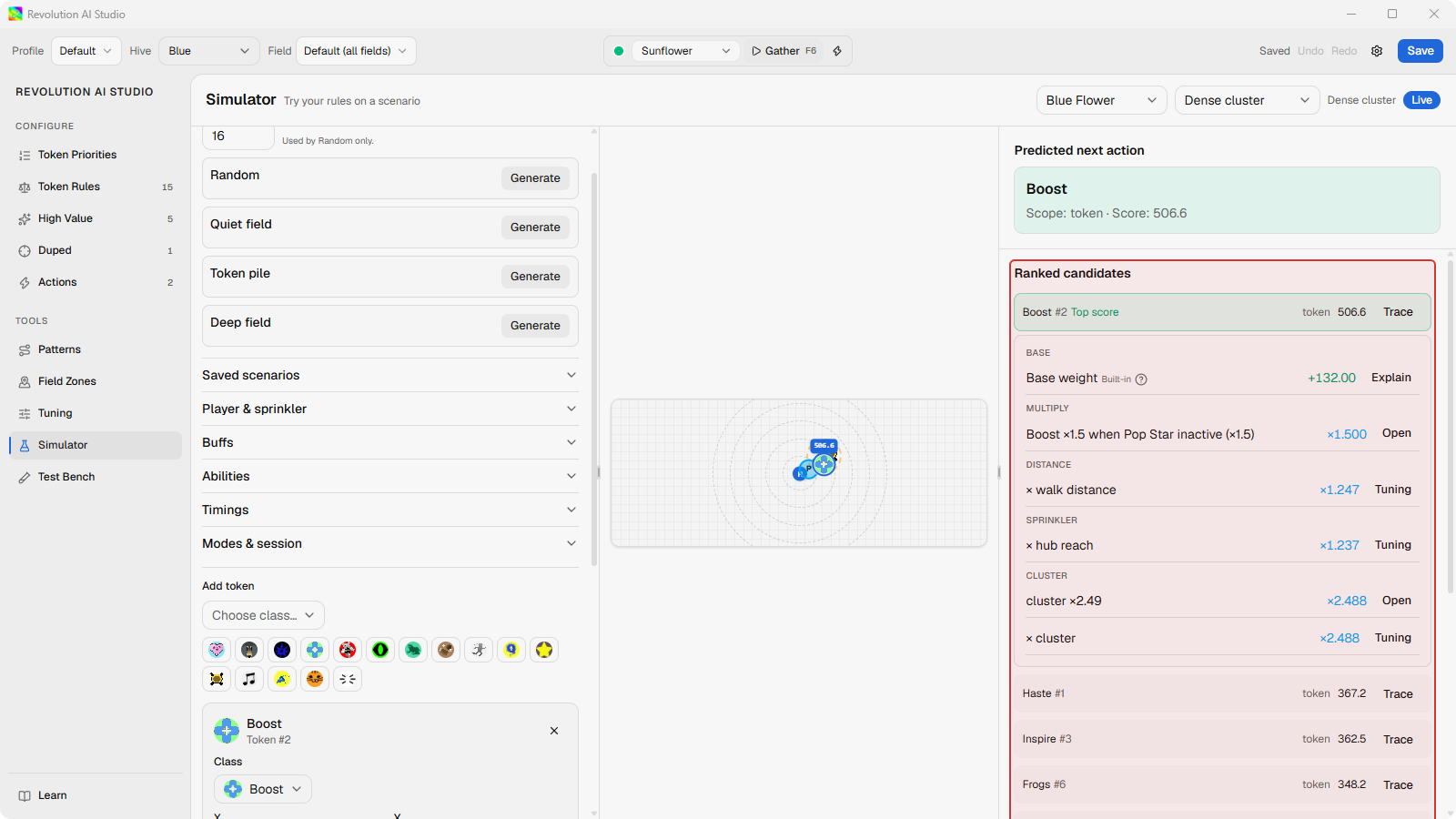
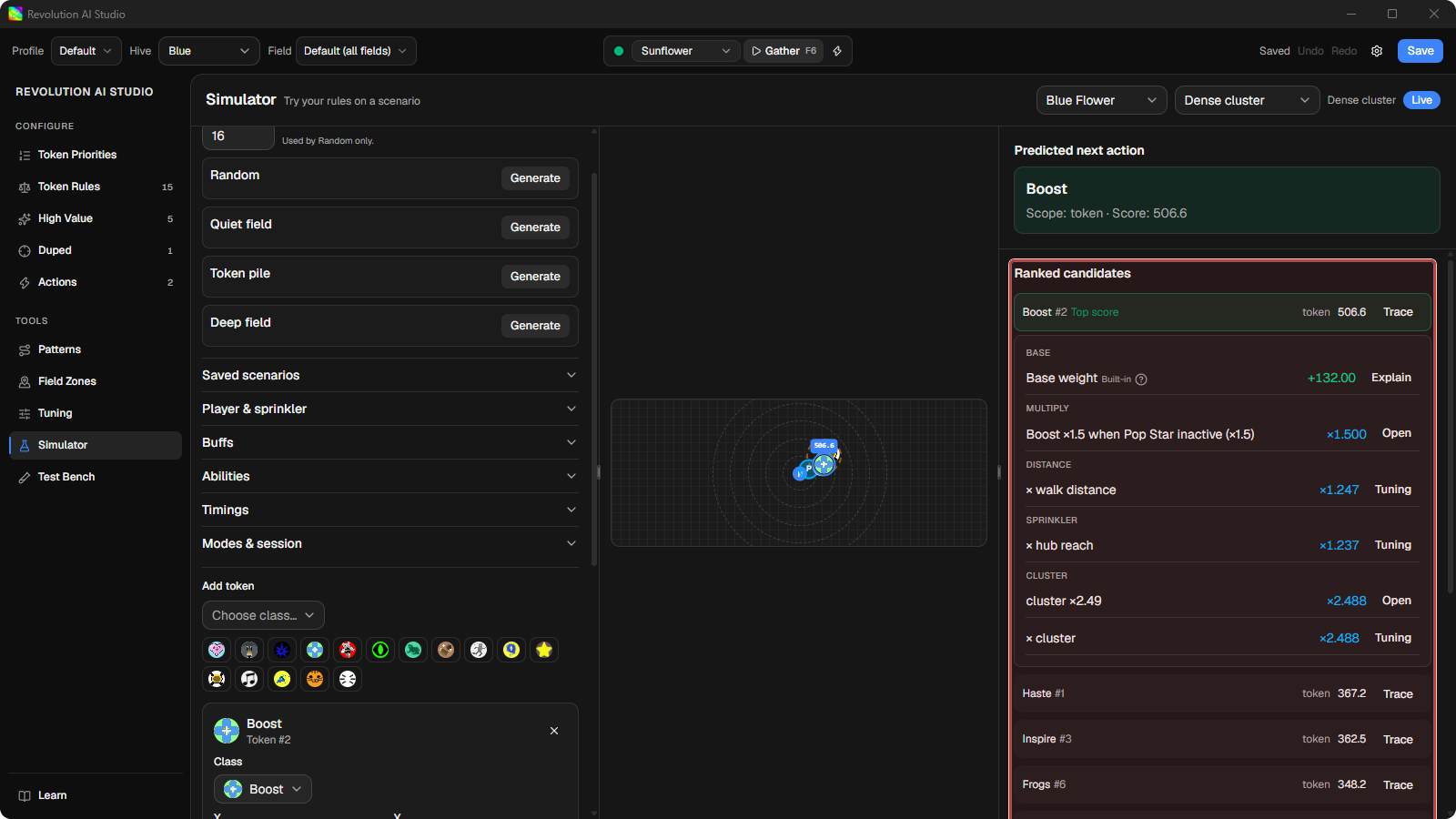
Four of those tokens tell the whole story:
| Token | Base weight | Rough distance | Result |
|---|---|---|---|
| Haste | 95 | 7 studs | First: 367.2 |
| Inspire | 95.5 | 11 studs | Second: 362.5 |
| Boost | 88 | 9 studs | Fourth: 337.7 |
| Loot | 65 | 13 studs | Last: 244.1 |
Haste starts at a base weight of 95 and sits about 7 studs away. It finishes first at 367.2 - the closest token of a strong class. Inspire starts even higher at 95.5, but it’s roughly 11 studs out and finishes second. Half a point of class isn’t worth four studs of walking. Boost starts lower at 88, and being closer than Inspire wasn’t enough to make up seven points of base weight. Loot starts at 65 and finishes last, because nothing in the profile comes to its rescue.
Open Trace on any of them and you’ll notice something useful. Every token on this field gets the same cluster bonus, ×2.488, for having other tokens close by. Their distance multipliers are almost identical too, because they’re all bunched together. So those bonuses cancel out, and the order comes straight from base weight - which is exactly why the top two finished less than five points apart.
What happens to a token’s score
Section titled “What happens to a token’s score”A token’s score is built in two stages.
First, what the token is worth to you right now. It starts at its base weight, which you set under Configure → Token Priorities. Then your rules change it. An adjust rule can add to it or multiply it, while its condition is true.
Then, how easy it is to get to. The macro multiplies that number by a few built-in bonuses and penalties for things the token can’t help: how far away it is, how long it’s been on the field, how sure the vision models are that it’s real, how far it is from the sprinkler, whether it’s inside a Field Zone you drew, and how many other tokens are near it. These show up in Trace as rows marked Built-in.
The highest score wins. High Value tokens, like Bear Morph, skip this contest entirely and get collected first.
Think of it this way: your rules decide what you want to collect, and the built-in curves decide how reachable that token is from where you’re standing. That order matters. If rules were added after the distance penalty instead, a rule adding +50 would be worth exactly as much for a token 40 studs across the field as one right next to you, and the macro would start walking to tokens that were too far away.
Now change one thing
Section titled “Now change one thing”Say you’d rather collect Inspire first. Add an adjust rule that adds 5 weight to Inspire. That 5 lands before the built-in bonuses, and on this field they multiply everything by roughly ×3.8, so those 5 points are worth close to 19 points of final score - far more than the gap you need to close. Try to predict Inspire’s new score before you look at it.
You can keep practicing this way on other fields and token layouts, writing your own rules and tracing how they change the scores.
When a token should never win
Section titled “When a token should never win”If you’d rather take a token out of the running entirely instead of outbidding it, that’s what a gate does. The token shows Gated in place of a score, and Trace names the rule that blocked it. You can see this in the default profile, which blocks Melody and Baby Love while their buff is above 30%.
If a gate that blocks and a gate that allows both match the same token, the block always wins, no matter which you wrote first. The mistake that prevents is stacking gates and expecting the newest one to win - it never does. So “why did this token get skipped?” always has one answer you can point at in Trace.
Where to look in the app
Section titled “Where to look in the app”Open Tools → Simulator, choose Dense cluster, and click Trace on the row marked Top score. While you’re writing a rule, Live preview beside the Rule Editor shows the same breakdown for whichever token you click.
Use Simulator and scenarios has the rest of the Simulator. When Trace shows a number you didn’t expect, Which editor fixes what tells you where to change it.