
Set up Mondo Hop and Mondo Chick
Mondo Blessing and Mondo loot come from killing Mondo Chick during the first 15 minutes of each hour. Mondo Hop searches public servers, kills Mondo Chick, and collects its loot after you enable it. This guide covers solo and multi-account Mondo Hop, plus Mondo Chick under Collect → Buffs.
Before you start
Section titled “Before you start”- You can find Mondo Hop at Tools → Mondo Hop, beside Vic Hop, Server Hop, RBC Gather, and Tad Sync.
- For Main plus Searcher Mondo Hop, connect every account on the same relay first (Connect accounts with relay).
- Do not enable RBC Gather or Tad Sync on the same account as Mondo Hop.
- For honeymaking, Mondo is usually not worth interrupting gather unless you consistently hit a strong blessing (about 4x+) with help.
Solo account
Section titled “Solo account”-
Open Tools → Mondo Hop. Turn Enabled on, leave Role at Main, and set Max Time to about 28 seconds.
-
Start the macro during or before minutes :00–:14.
-
Status may show
Finding New Server,Searching For Mondo,Killing: Mondo Chick, thenLooting: Mondo Chick. Webhook or log can showMondo Looting Finishedwhen loot time ends.
Main plus Searcher alts
Section titled “Main plus Searcher alts”Connect every account on the same relay first (Connect accounts with relay). Then set Mondo Hop roles:
Host (Main account)
Section titled “Host (Main account)”- Open Tools → Mondo Hop. Turn Enabled on, leave Role at Main, and set Max Time to about 28 seconds. Stats cards for Servers Hopped and Mondos Killed are visible when Enabled is on.
Each Searcher alt
Section titled “Each Searcher alt”- Open Tools → Mondo Hop. Turn Enabled on and set Role to Searcher.
Confirm
Section titled “Confirm”-
Start the macro on Searchers, then Main, during or before minutes :00–:14.
-
On Main, Status may show
Finding New Server,Searching For Mondo,Killing: Mondo Chick, thenLooting: Mondo Chick. -
Webhook or log can show
Mondo Looting Finishedwhen loot time ends.
Collect Mondo Buff without Mondo Hop
Section titled “Collect Mondo Buff without Mondo Hop”If you only want the hourly Mountain Top visit without hopping public servers:
-
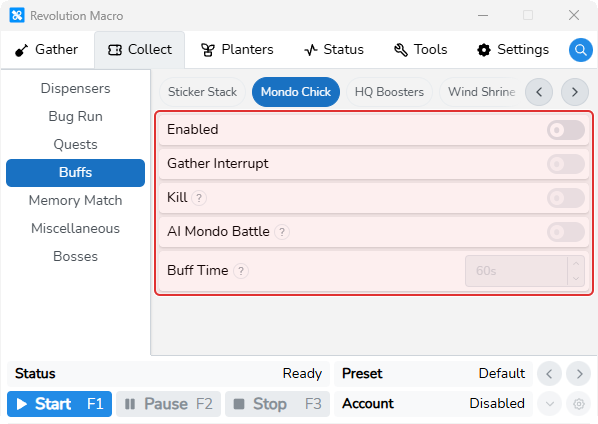
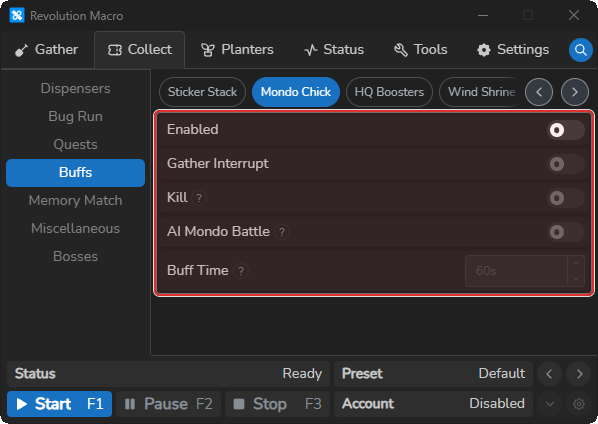
Open Collect → Buffs → Mondo Chick. Turn Enabled on. Gather Interrupt, Kill, AI Mondo Battle, and Buff Time become usable.
-
Set Kill, AI Mondo Battle, Buff Time, and Gather Interrupt for your goal. Buff Time is editable only when Kill is off.
-
Run the macro so the Mondo Buff task can fire in the hourly window through minute 14. Status may show
Buff: Mondo Chick, or fight and loot status if Kill is on.
Loot With AI
Section titled “Loot With AI”When Mondo Chick dies, it drops loot tokens on Mountain Top. Walking a pattern to pick them up is slow and easy to miss. Loot With AI uses AI to collect that loot after the kill. It walks directly to the loot tokens. You can find these settings under Tools → Mondo Hop. Turn Loot With AI on unless you want the traditional walk loot pattern. Without AI, loot collection may not be as fast or as accurate.
-
Open Tools → Mondo Hop. Turn Loot With AI on.
-
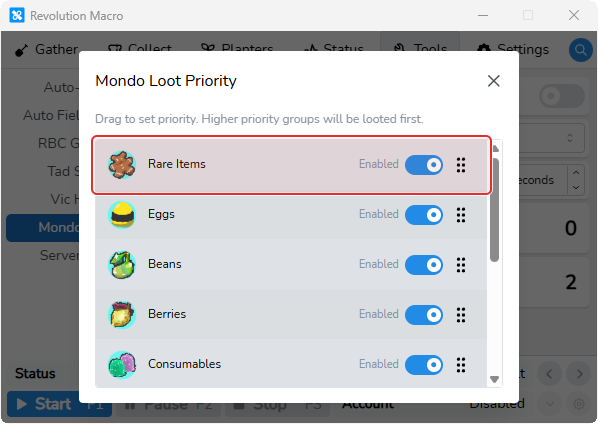
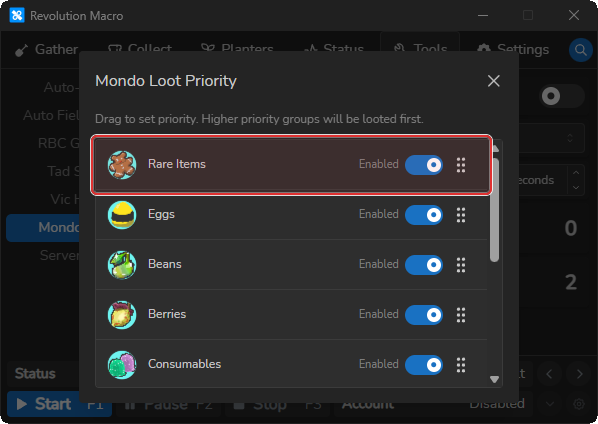
Click the Loot With AI gear to open Mondo Loot Priority. Drag higher-priority groups to the top, and turn Off any loot classes you do not want AI to pick up after the kill.
-
If the Loot With AI gear is disabled, turn off Gather → AI Gather → Settings → Eco Mode, then open Mondo Loot Priority again.
Loot With AI
Section titled “Loot With AI”When on, the macro collects loot with AI after Mondo dies. When off, it walks a traditional loot pattern instead. Turn on for AI loot. Leave off if you want the walk pattern or AI loot is failing to load. Without AI, loot collection may not be as fast or as accurate.
Mondo Loot Priority
Section titled “Mondo Loot Priority”Opens Mondo Loot Priority so you choose which loot classes AI collects after Mondo kills (Beans, Berries, Buffs, Consumables, Eggs, Fruits, Passes, Rare Items, Tickets, Waxes). Drag to set priority. Higher groups are looted first. Groups left Enabled are collected. Turning a group Off skips that class. Default weights prefer Rare Items, then Eggs, then Berries and Beans. Raise Rare Items or Eggs when farming those. Disable groups you do not want.
More settings
Section titled “More settings”Enabled (Mondo Hop)
Section titled “Enabled (Mondo Hop)”Turns Mondo Hop on so the account hops public servers to find Mondo Chick while Mondo is active (minutes 0–14). Turn on for Mondo Hop runs. Outside :00–:14, Mondo Hop stays inactive.
Tools → Mondo HopMain kills and loots Mondo. Searcher hops and helps kill, then skips loot collection. Set Main on the account that should loot. Set Searcher on helper hop accounts. Searchers can show Waiting For Mondo Server until a fight is queued. When a Mondo server is announced, connected accounts may join that server over the relay.
Max Time
Section titled “Max Time”Maximum seconds to loot after Mondo dies (UI 15–60, default 30). Looting never runs shorter than about 15 seconds even if you set a lower value. The product guide recommends about 28 seconds for Mondo Hop loot.
Enabled (Mondo Chick)
Section titled “Enabled (Mondo Chick)”Enables the hourly Mondo Buff task for a Mountain Top visit without Tools → Mondo Hop. Mondo usually is not worth enabling for honeymaking unless you consistently hit a strong blessing (about 4x+) with help. The task only schedules inside the hourly window ending at minute 14. In the first hour after gather start, the task is skipped if Mondo Blessing is already present.
Gather Interrupt
Section titled “Gather Interrupt”When on, the Mondo Buff task can stop gathering as soon as it is ready. Turn on if Mondo buff timing matters more than finishing the current gather cycle.
Collect → Buffs → Mondo ChickWhen on, the macro kills and loots Mondo Chick instead of a short buff-only wait. Buff Time is disabled in the UI while Kill is on. Turn on when you want a full kill and loot from Collect → Buffs → Mondo Chick. With Kill on, the attack wait can run up to about 14 minutes instead of Buff Time.
AI Mondo Battle
Section titled “AI Mondo Battle”With Kill on, the macro uses AI battle (cannon to Mountain Top nametag fight) instead of the simpler kill wait. Turn on for faster AI kills. Turn off if damage or defense is too low for reliable AI fights. AI battle gives about 5 seconds of initial tracking, then about 5 seconds missing before it gives up.
Buff Time
Section titled “Buff Time”Seconds to attack or stay for Mondo when Kill is off before returning to gather (default 60). Keep 60 for a typical buff visit. Ignored when Kill is on.
Troubleshooting
Section titled “Troubleshooting”conflicting tools detected
Section titled “conflicting tools detected”Cause: RBC Gather or Tad Sync is enabled on the same account as Mondo Hop.
Fix:
- Open Tools → RBC Gather or Tools → Tad Sync on that account.
- Turn Enabled off on whichever tool is conflicting.
- Start the macro again with only Mondo Hop enabled among networked tools.
Failed to find Mondo Chick!
Section titled “Failed to find Mondo Chick!”Cause: AI Mondo Battle on Collect → Buffs → Mondo Chick could not find the Mondo nametag at Mountain Top.
Fix:
- Retry in the next hourly window through minute 14.
- Turn AI Mondo Battle off and leave Kill on for the simpler kill wait, or turn Kill off for a buff-only visit.
- Or set up Mondo Hop with a Searcher alt on a relay to search and join Mondo servers.
Looting Failed: No Loot Detected or AI loot falls back to walking
Section titled “Looting Failed: No Loot Detected or AI loot falls back to walking”Cause: No loot appeared within about 5 seconds after the kill, or the Mondo loot AI model failed to load.
Fix:
- Wait for the next Mondo attempt if loot simply did not drop in time.
- Leave Loot With AI off on Tools → Mondo Hop if you want the traditional walk loot pattern on purpose.
- If AI loot keeps failing to load, leave Loot With AI off. The macro falls back to traditional walk collection automatically.
More help
- Detection problems — AI model load failures and screen-read errors that can affect Mondo loot or battle.