
Hotkeys for Bee Swarm Simulator
You can find Start Macro, Pause Macro, and Stop Macro under Settings → Macro → Hotkeys. These shortcuts control whichever account is active in Revolution. When you run more than one account, switch to the one you want before you press a key.
Bind Start, Pause, and Stop
Section titled “Bind Start, Pause, and Stop”-
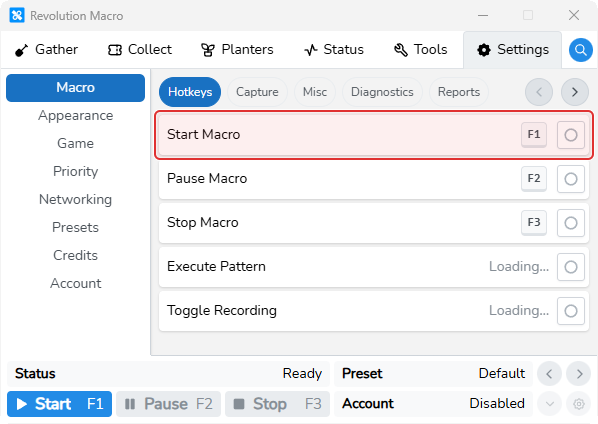
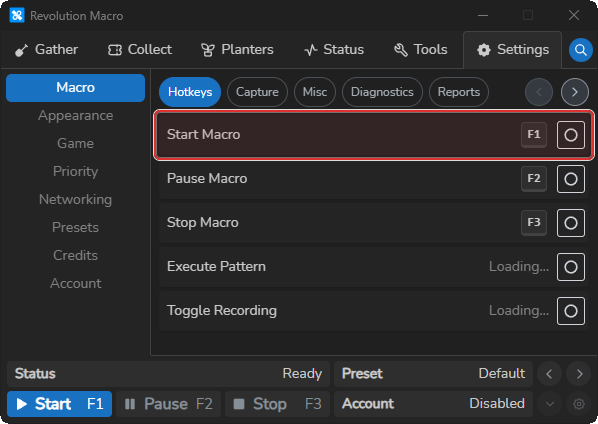
Open Settings → Macro → Hotkeys.
You see rows for Start Macro, Pause Macro, and Stop Macro. Defaults are F1, F2, and F3.
-
Click the record button on a row.
The row enters recording and shows keys as you press them.
-
Press the desired key or chord, then release all keys.
The new chord is saved and shown on that row.
Start Macro starts the active account when it is stopped or paused. Pause Macro pauses it while running. Stop Macro stops it while running.
Defaults and clearing
Section titled “Defaults and clearing”Defaults are F1 (Start), F2 (Pause), and F3 (Stop). On startup, non-empty legacy Start / Pause / Stop values are copied into the hotkey list as named entries.
To clear a hotkey, click record on that row, then press Esc or Backspace. That deletes the entry from settings. The row may then show No Hotkey Configured or Loading….
- Loading… means the hotkey entry is missing. The record button stays disabled until the entry exists again.
- No Hotkey Configured means the entry exists but has an empty sequence.
If Start Macro, Pause Macro, or Stop Macro disappear after you clear a binding, restart the app so defaults can be re-seeded, then re-record.
On macOS, Control, Command, and Option display as ⌃, ⌘, and ⌥. On Windows, Control shows as Ctrl and Command as ⊞ Win.
More settings
Section titled “More settings”Start Macro
Section titled “Start Macro”Default F1. Starts the active account when it is stopped or paused.
Pause Macro
Section titled “Pause Macro”Default F2. Pauses the active account when it is running.
Stop Macro
Section titled “Stop Macro”Default F3. Stops the active account when it is running.
Execute Pattern
Section titled “Execute Pattern”Shown only when Developer Mode is on. Runs a developer pattern hotkey.
Capture, load timeout, and diagnostics share Settings → Macro with Hotkeys. See Capture and diagnostics. Key Delay is under Settings → Game → Movement on Game settings.
Hotkey row stuck on Loading…
Section titled “Hotkey row stuck on Loading…”Cause: The hotkey entry for that row is missing from settings. A missing entry shows Loading… with the record button disabled. Clearing a hotkey with Esc or Backspace during recording deletes the entry.
Fix:
- Restart Revolution so Start, Pause, and Stop defaults can be re-seeded on startup.
- Open Settings → Macro → Hotkeys again and confirm the row no longer shows Loading….
- Click record on the row and press your desired chord.
- If RBC Gather hotkey rows show the same Loading… state, rebind under Tools → RBC Gather → Hotkeys after the app restart. See RBC alt gather.